
Getting started
Projects and Saving
The True Robotics Design Playground asks Would you like to autosave this project? when you start. Say Yes, pick a folder and a name, and every change saves to that .trdesign or .trassembly file as you work. Say No to start right away and save later with the Save button or Ctrl+S. Safari, iPads and Firefox save in the browser instead.
Read what happens in this video
We click New Project and pick Standard, and the app asks whether to autosave. We click Yes, autosave, and the computer's save window opens so you can pick a folder and type a name; the video skips past it. The project takes the name Robot Plate, and the purple bar says Saved to Robot Plate.trdesign. After each change it shows Saving for a moment, then Saved again.
The steps in the video:
- Click New Project, then click the Standard picture.
- The app asks about autosave. Click Yes, autosave.
- Type Robot Plate for the file name, pick a folder and click Save.
- Your project is now called Robot Plate. The bar says Saved to Robot Plate.trdesign.
- Click Top in the list on the left, then click Sketch.
- Press G, click the origin, type 2, press Tab, type 1 1/2 and press Enter.
- Press Enter to finish. Watch the bar say Saving, then Saved again.
What kinds of files does it save?#
| File | What it holds | Made by |
|---|---|---|
.trdesign | A part: every shape and group in a Basic project, or every sketch, dimension and feature in a Standard one. | New Project |
.trassembly | An assembly: its parts, their copies and every mate. It carries a copy of each part inside, so it opens complete anywhere. | New Assembly |
.stl and .step | Files for 3D printers and other CAD programs. They are exports, not projects. | Export |
How do I turn on autosave?#
On the home screen, click New Project (or press N) and pick Basic or Standard, or click New Assembly. It opens right away.
A small window asks Would you like to autosave this project? (or this assembly?). Click Yes, autosave.
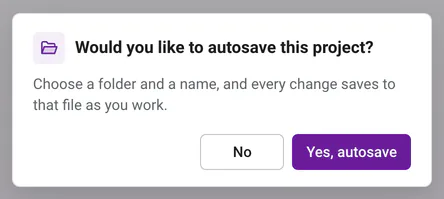
Every new project asks once. Yes saves every change to a file you name, and No lets you start right away and save later. Your computer's save window opens. Pick a folder, such as your class folder, type a name like
Robot Plateand click Save.The name you typed becomes your project's name, and the purple bar says Saved to Robot Plate.trdesign.
From then on, every change you make is written to that file a moment later. There is no save button to remember, and your file is always up to date. Your project is also kept in this browser, so it shows in Open Project.
Good to know: Safari, iPads and Firefox
These browsers have no save window, so Yes, autosave saves in the browser instead, and the purple bar says Saved in this browser. Use Download a copy from the three dots menu whenever you want a file.
What if I said No?#
No problem. No (or closing the save window) lets you start designing right away, and nothing is saved yet. The purple bar shows Not saved with a small Save button, so you always know.

- Click Save, or press Ctrl+S (Cmd+S on a Mac), when you are ready. The save window opens, and autosave turns on from then on.
- If you try to close the tab before saving, your browser asks first, so your work is never lost by accident.
- A project that was never saved isn't in Open Project or an assembly's Insert window yet.
What does the save status mean?#
Next to your project name in the purple bar, a short message always tells you where your work is.

| You see | What it means | What to do |
|---|---|---|
| Not saved with a Save button | You said No to autosave, so nothing is saved yet. | Click Save or press Ctrl+S to pick a folder and a name. |
| Saving... | Your latest change is being written right now. | Nothing. Keep designing. |
| Saved to My Part.trdesign | Your file on the computer is up to date. | Nothing. You are all set. |
| Saved in this browser | Safari, iPads and Firefox keep your project inside the browser. | Use Download a copy when you want a file. |
| Choose where to save | Your project is saved in the browser, but not in a file yet. | Click it to pick a folder and file name. |
| Click to keep saving to My Part.trdesign | The browser needs your OK again before it writes to the file, which often happens after the browser restarts. | Click it and allow the browser to save changes. |
| Choose where to save with a warning | The file was moved, renamed or deleted, so it can't be saved there. | Click it and pick a new place to save. |
| Choose which to keep | The project changed in another tab, or its file changed somewhere else. | Click it and pick a version. Either way, nothing is lost. |
| Not saved. Download a copy | This browser can't store projects right now, like in some private windows. | Click it to download a file of your work. |

Do I ever need to press save?#
Not with autosave on. Every change saves on its own. If you like the habit, Ctrl+S (Cmd+S on a Mac) saves right away and shows Saved. at the bottom of the screen. If you try to close the tab while a change is still on its way, your browser asks first, and switching to another tab saves right away too. With autosave off, Ctrl+S opens the save window and turns autosave on. On the home screen there is nothing open to save, so Ctrl+S just says so.
How do I rename a project?#
Click the name in the purple bar, type a new one and press Enter. That changes the name inside the project and in your project list. A file on your computer keeps its file name until you save to a new file.
How do I open a project again?#
Click Open Project on the home screen (or press O). You will see every project and assembly saved in this browser, newest first, each with a picture, a Basic, Standard or Assembly badge, its units and when it was last edited, like Edited 5 minutes ago. In Chrome, Edge and on Chromebooks, a project linked to a file also shows its file name. Click one to open it.
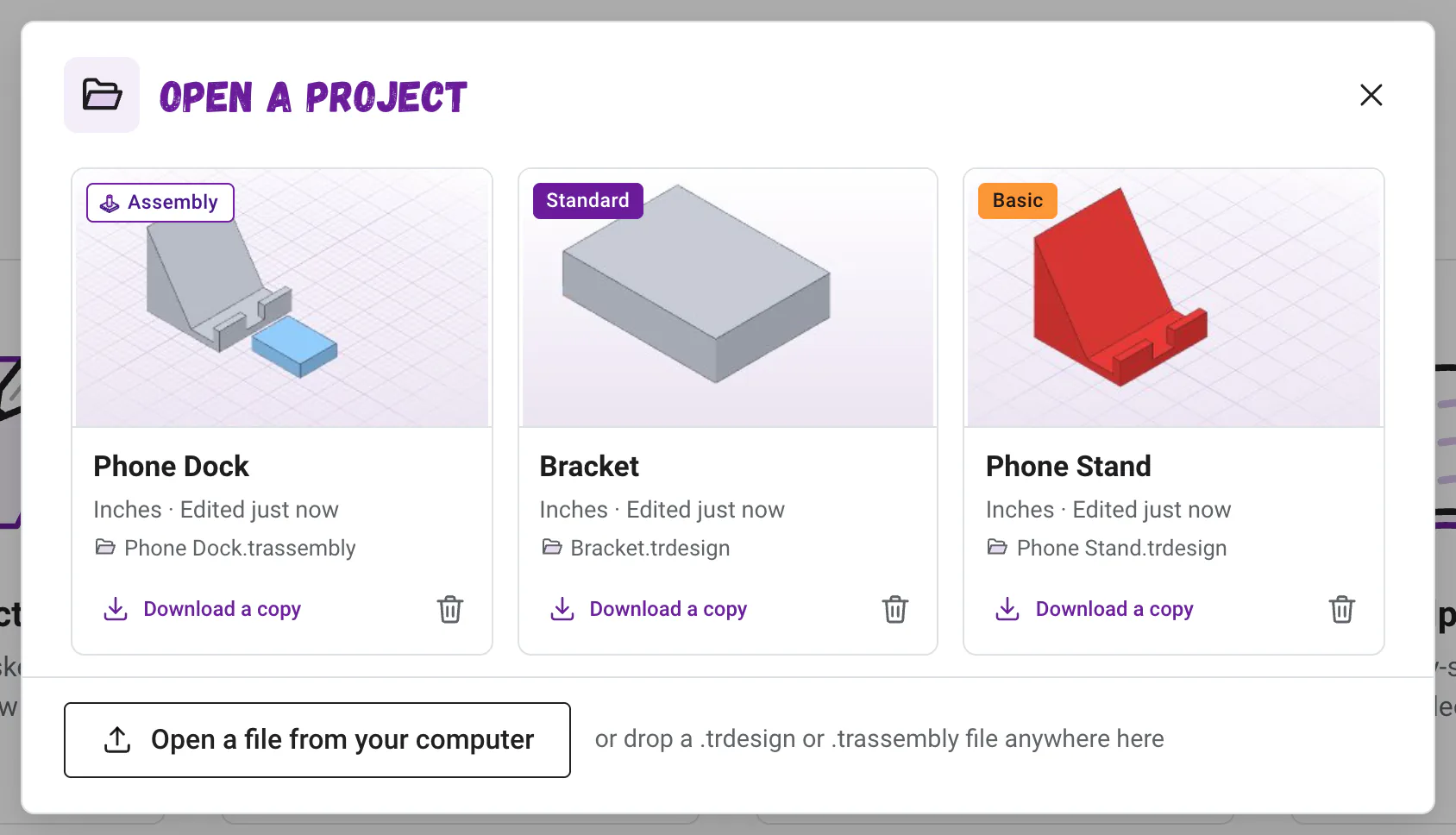
When a project is linked to a file, the app reads the file and opens whichever copy is newer, the file or the browser's copy, so you always get your latest work.
How do I open a file from my computer?#
In Open Project, click Open a file from your computer and choose a .trdesign or .trassembly file, or simply drag the file onto the home screen and drop it anywhere. In Chrome, Edge and on Chromebooks, a file you open this way keeps saving back to itself. You can even drop a project file onto the workspace while you design: the app asks Open My Part? and saves your current project first, so nothing is lost.
With the app installed in Chrome or Edge, or on a Chromebook, you can also double-click a project file to open it in a window of its own. Install and use it offline shows how.
Good to know: Why did my file open as a copy?
If this browser already has a newer version of the same project, the file opens as a separate project with (copy) after its name. That way an old download can never overwrite newer work.
Read what happens in this video
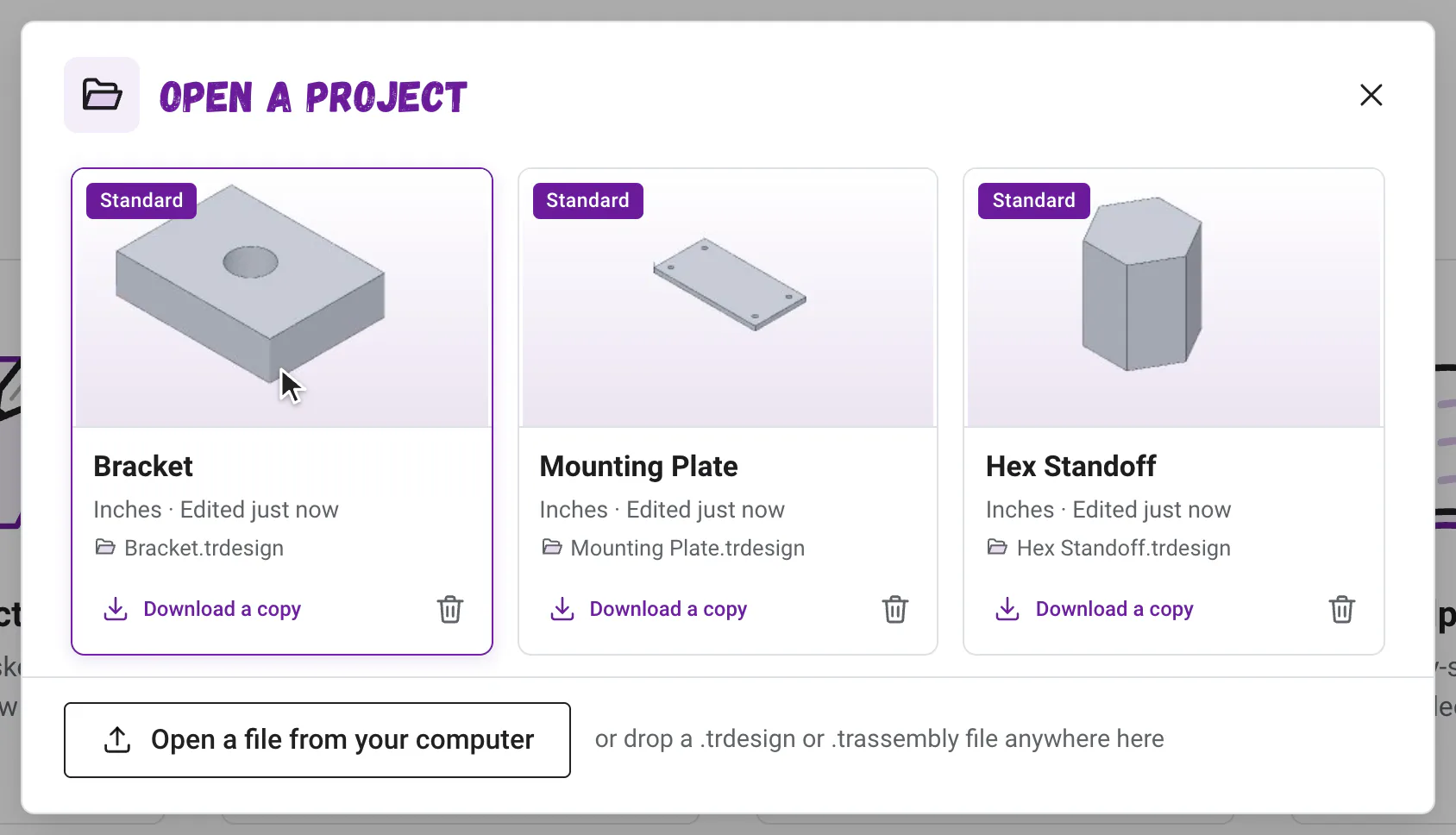
Open Project lists the projects saved in this browser, newest first, and clicking Bracket opens it. The three dots menu has Download a copy, which saves a .trdesign file to the Downloads folder. Back in Open Project, dropping a .trdesign file onto the window opens it too.
The steps in the video:
- Click Open Project. Your saved projects show, newest first.
- Click the Bracket tile to open it.
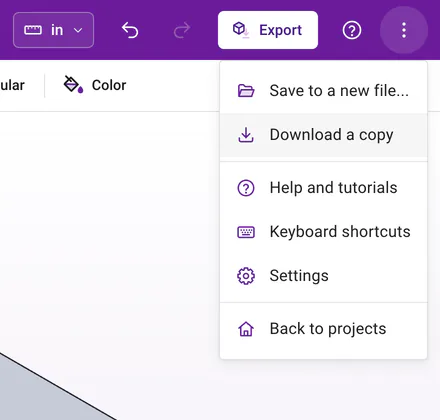
- Click the three dots menu, then click Download a copy.
- Open the three dots menu again and click Back to projects.
- Click Open Project again.
- Drag a .trdesign file from your computer onto the window to open it.
How do I download a copy?#
Click the three dots at the right end of the purple bar and choose Download a copy. A .trdesign file (or .trassembly for an assembly) with your project's name lands in your Downloads folder. Each project in Open Project also has its own Download a copy button. Download a copy to move a project to another computer, turn it in to your teacher, or keep a backup.
How do I save to a different file?#
In Chrome, Edge and on Chromebooks, the three dots menu has Save to a new file.... Pick a new folder or name, and from then on your project saves to the new file.
Which browsers can save to a file?#
| Browser | Where projects save | How to keep a file |
|---|---|---|
| Chrome or Edge on Windows or Mac | To the file you choose, and in the browser | Automatic with autosave |
| Chromebooks | To the file you choose, and in the browser | Automatic with autosave |
| Safari on a Mac | In the browser | Download a copy |
| iPad and iPhone | In the browser | Download a copy |
| Firefox | In the browser | Download a copy |
Heads up: Browser saves stay in that browser
A project saved in the browser lives only in that browser on that computer. A different computer, a different browser or clearing your browsing data will not have it, so download a copy of anything you want to keep. On an iPad, the app on your Home Screen keeps its projects apart from Safari's, too.
How do I delete a project?#
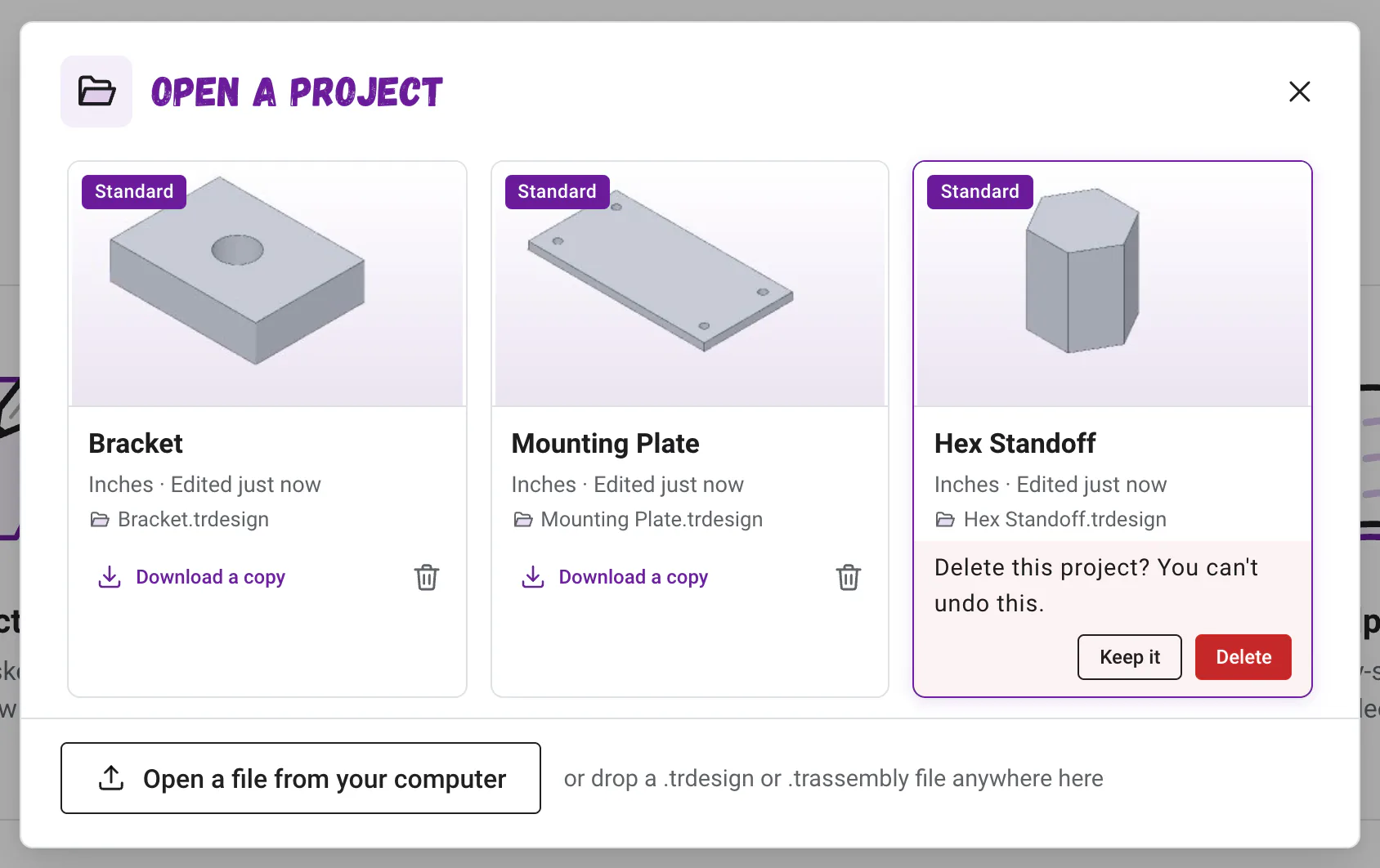
In Open Project, click the trash can on the project. The tile asks Delete this project? You can't undo this. (or Delete this assembly?) with Keep it and Delete buttons. Deleting removes the copy saved in this browser. A file you saved on your computer stays right where it is.
Where do I pick units?#
New projects and assemblies start in Inches. Switch anytime from the units button in the purple bar (in the three dots menu on a phone), to Centimeters or back. Your part keeps its exact size either way. A project saved in millimeters with an older version still opens just as it was, and shows mm until you pick Inches or Centimeters. Units and typing math explains more.
Saving is one less thing for your class to think about, so the whole period goes to designing. Happy building!
Questions and answers#
Does the True Robotics Design Playground save my projects to the cloud?
No. Projects save in a file you choose or inside your browser, never on a server. If your computer syncs a folder, such as OneDrive or Google Drive for desktop, choosing that folder in the save window keeps your file backed up there too.
What is a .trdesign file?
It is a True Robotics Design Playground part file. It holds every shape, sketch, dimension and feature, so you can open it again and keep editing. To 3D print, use Export instead, because slicers open STL files, not .trdesign files.
What is a .trassembly file?
It is a True Robotics Design Playground assembly file. It holds the assembly's parts, their copies and every mate, with a copy of each part inside, so it opens complete on any computer.
What happens if I say No to autosave?
You start designing right away, but nothing is saved until you click Save in the purple bar or press Ctrl+S. Then you pick a folder and a name, and autosave turns on from there.
Can I undo changes after I close and reopen a project?
Undo works for the changes you make while a project is open. When you open it again, the project has all of your work, and the undo list starts fresh.
Why does the purple bar say Click to keep saving?
Your browser forgot its permission to write to your file, which often happens after it restarts. Click the message and allow the browser to save changes, and the True Robotics Design Playground saves your latest work to the file right away.